When the demo works—but the real workflow doesn’t
You run a polished demo: the assistant greets a new user, asks two questions, and produces a clean “next steps” summary. Then you put it into the real workflow, where one missing detail changes what happens later, and the output starts drifting.
If the procedure depends on earlier answers, the model can skip a step, reuse an old assumption, or “fill in” a blank to keep the conversation moving. That looks smooth on screen, but it can route a customer to the wrong queue, apply the wrong policy, or create a record you can’t easily unwind.
The hard part isn’t getting a good final paragraph. It’s knowing which step failed first—and which parts of your procedure are most likely to break under pressure.
Which parts of your procedure are most likely to break first?
Under pressure, the first failures usually show up in the “small” steps that don’t look like the point of the workflow. The assistant confirms an ID, checks eligibility, or asks a required question—then jumps ahead because it already “gets” what the user wants. In onboarding, that can mean creating an account before consent is recorded. In support triage, it can mean escalating without collecting logs.
The next weak spot is branching. If a later step depends on a specific earlier answer, the model may carry forward a guess instead of stopping. You’ll see it when two similar policies exist and a single missing field decides which one applies. The output stays confident, but the path is wrong.
Finally, watch steps that must match a system of record: status fields, timestamps, ticket categories. If the assistant can’t read back what it wrote, you’ll spend time reconciling mismatches—before you even fix the original miss.
You notice a skipped step—can you still trust the final answer?
That mismatch usually shows up as a small gap: you realize the assistant never asked for a required field, never confirmed eligibility, or never recorded consent—yet it still produces a polished “done” summary. In that moment, the final answer stops being the thing to judge. The question is whether the assistant’s path is still valid given what was skipped.
If the skipped step changes which branch should have triggered, you can’t trust anything downstream. A support bot that escalates without logs may land in the right queue by luck, but it can’t justify it. An onboarding bot that “assumes” a region can apply the wrong policy, even if the welcome email reads perfectly. Treat missing prerequisites like a broken chain: once one link is out, later steps might be consistent with the wrong starting point.
The practical headache is detection. You won’t see the gap unless the assistant exposes what it collected and what it didn’t—and that’s where you start deciding which steps must be enforced by tools, not tone.
Where deterministic tools should take over (even if the model sounds confident)
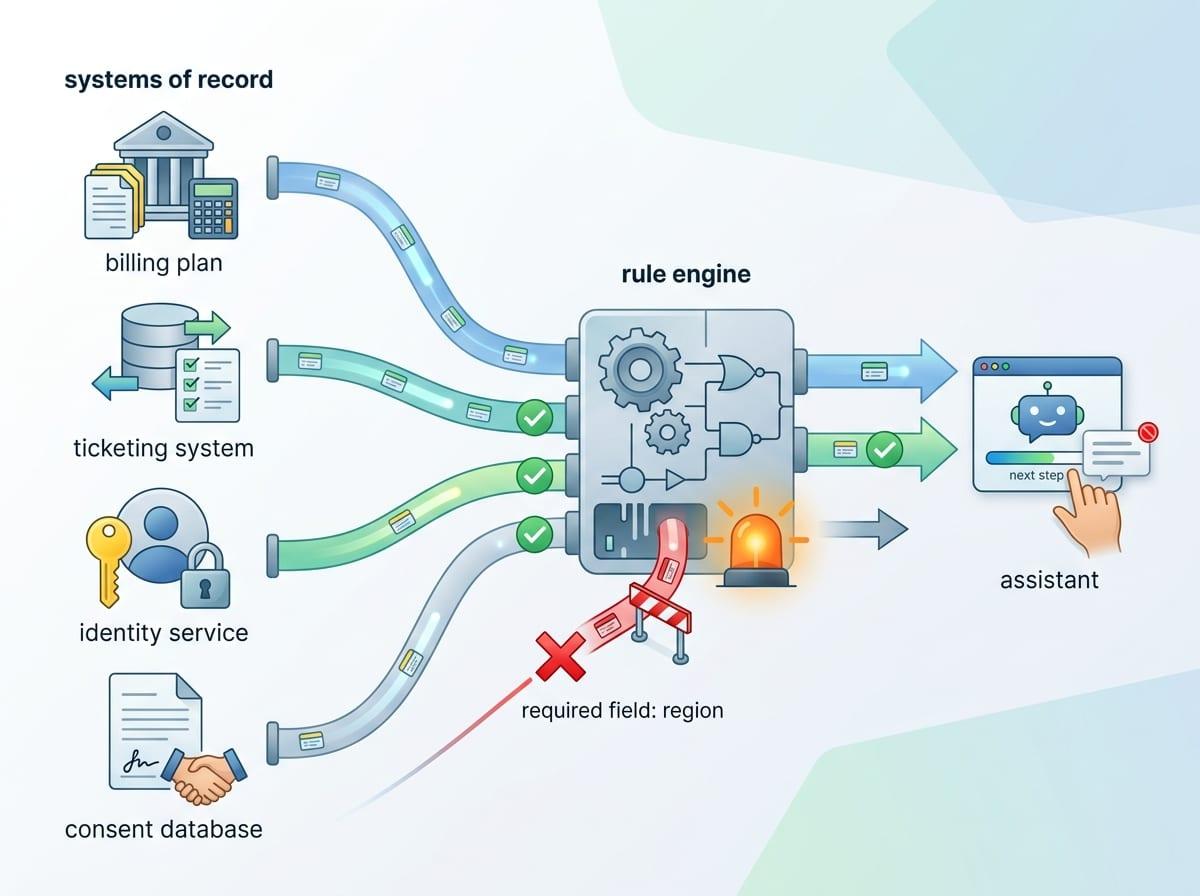
In a real workflow, “sounds right” is often what you get when the assistant can’t show what it actually collected. A user asks to reset access, the assistant replies with the correct policy language, and everyone relaxes—until you realize it never verified identity or checked the account’s lock status. That’s the moment to stop judging the prose and start enforcing the path.
Deterministic tools should own steps where the output must match a system of record: fetching a user’s plan, reading ticket status, confirming timestamps, writing consent flags, and calculating eligibility from fixed rules. If the assistant needs “Region = EU” to pick a policy, don’t let it infer the region from tone or past chats; make it call a lookup or force a structured question and block progress until it’s answered.
This adds cost and time. You’ll build integrations, handle outages, and deal with “we can’t access that system right now” moments. But you also get a clean failure mode: the assistant can’t move forward without the field, and the next step can’t silently drift.
Designing the assistant like a checklist, not a conversation
Once the assistant can’t move forward without the right field, the interface has to stop rewarding smooth conversation and start rewarding completion. In practice, that means the assistant should behave like a checklist: show the required steps, mark what’s done, and keep the “next action” tied to a specific prerequisite. If identity verification is step two, the assistant shouldn’t be able to jump to “reset complete” until that box is checked by a tool result or a user-confirmed value.
This is easier to manage if each step writes a small, structured state: fields collected, branch chosen, tool calls run, and any open questions. Then the assistant’s job is to move from one state to the next, not to improvise a persuasive summary. A support triage flow can literally display “Logs collected: No” and block escalation, even if the user insists they’re in a hurry.
The downside is friction. Users will feel the “form-ness” when the assistant refuses to proceed, and teams will push to loosen it. Keep the checklist tight where mistakes are expensive, and you’ll know exactly what to verify—and when to hand off.
What to verify, when to escalate, and how to keep failures contained

That “form-ness” is exactly what lets you decide, in real time, what to verify and what can slide. In practice, most teams end up with three layers: hard checks, soft checks, and human handoffs. Hard checks are the non-negotiables—identity verified, consent recorded, eligibility computed from rules, and any field that changes the branch. If a hard check is missing, the assistant stops and asks, or calls a tool again.
Soft checks are about catching drift without blocking the user every time. You can run a quick self-audit: “List the required fields for this path and mark which are present.” Then compare that list to the saved state. This is cheap, but it will still miss cases where the state is wrong because the tool failed or the user lied.
Escalate when the assistant can’t prove a prerequisite, when a tool is down, or when the action can’t be undone (closing an account, changing access, applying a policy). Containment is simple: limit what it can write, keep changes behind a review step, and log the exact step where it got stuck so the blast radius stays small.
A pragmatic bar for shipping multi-step AI: visible state, bounded autonomy
Once you’re logging the exact step where it got stuck, you can set a shipping bar that’s easy to defend: the assistant must show state you can inspect, and its autonomy must be bounded by that state. In a support flow, that means a visible checklist of required fields, the chosen branch, and the last tool result—so a PM, agent, or auditor can see why escalation happened.
Bound autonomy is concrete: allow it to draft, summarize, and ask for missing inputs, but gate irreversible actions behind hard checks and a tool-confirmed “ready” flag. The cost is real. You’ll ship more “I can’t proceed yet” moments, and stakeholders will call it worse UX. It’s the only way to make multi-step failure obvious, not silent.
If you can’t point to the state and the limits, you’re not shipping a workflow. You’re shipping a story.